Sky Stream is Sky’s streaming TV service that brings live channels, on-demand content, and popular apps straight to your home — no satellite dish required.
Instead of relying on a satellite, it uses your home broadband connection, so you can set it up quickly and easily, whether you rent, live in a flat, or just want a simpler Sky TV experience.
What is Sky Stream?
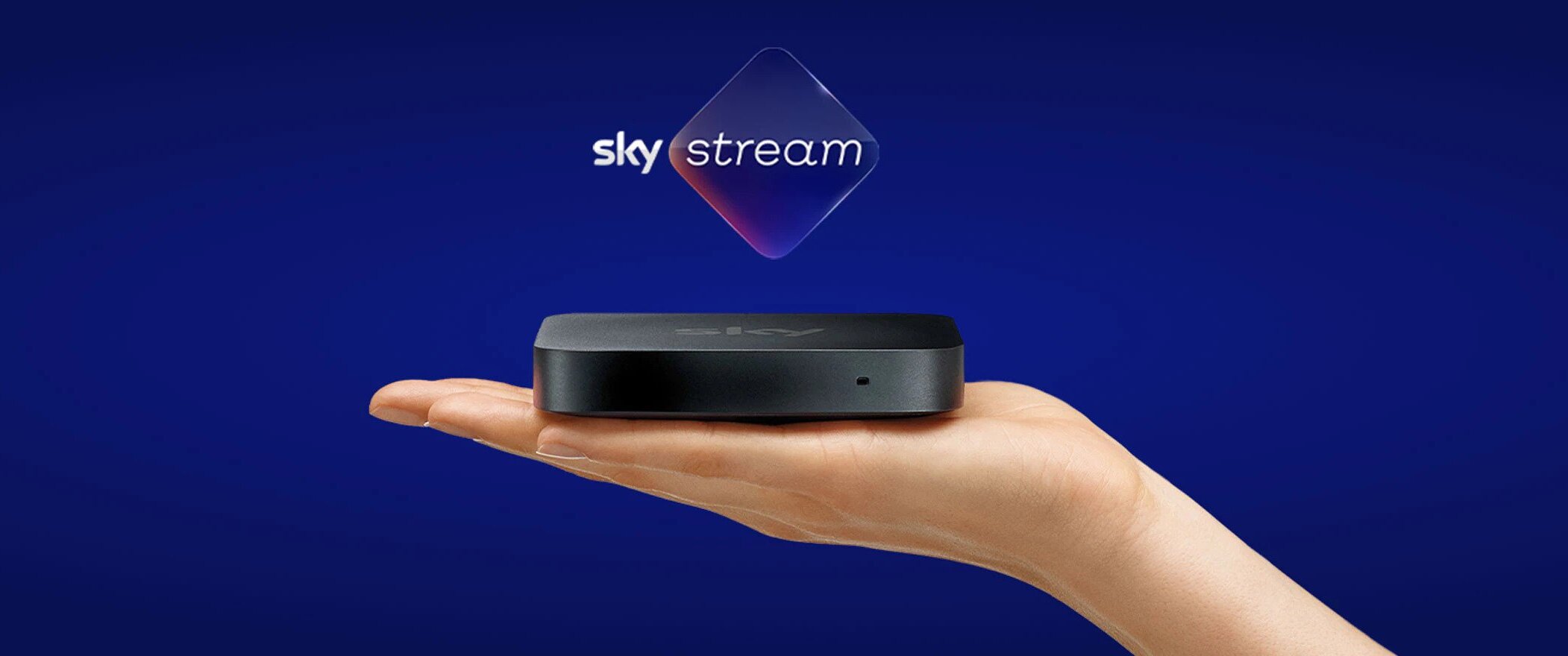
Sky Stream puck is small and palm-sized. You plug it into your TV via HDMI, connect it to the internet, and you’re ready to start watching. Once it’s set up, you can access Sky TV channels, on-demand box sets, and streaming apps — all in one place.
With Sky Stream, you don’t need a satellite dish. Everything is delivered over broadband, and you can choose between a 31-day rolling plan or a 24-month contract for the best value. Prices start from £15 a month, and because you don’t need an engineer, you can often get up and running within 24 hours.
What content is on Sky Stream?
You can choose from two main TV packages:
Sky Essential TV
Includes over 90 channels, Sky Atlantic, Netflix Standard with Ads, Discovery+, and on-demand box sets and catch-up content.
Sky Ultimate TV
Includes everything in Essential, plus premium entertainment channels like Sky One, Sky Witness, National Geographic, and dozens more shows and movies.
We’ve put together an in-depth guide comparing Sky Essential vs Sky Ultimate TV, breaking down channels, on-demand content, pricing, and which package suits different viewing habits.
Compare Sky Essential vs Sky Ultimate TV
On-Demand Apps
With Sky Stream, you can enjoy all the top on-demand apps in one place.
The current list includes:
- Popular streaming: Amazon Prime Video, Apple TV+, Disney+, Netflix, Paramount+, discovery+, LIONSGATE+
- UK TV catch-up: BBC iPlayer, ITVX, Channel 4, My5, STV Player
- Video & music: YouTube, YouTube Kids, Spotify, Amazon Music, BBC Sounds, RadioPlayer, Global Player, XITE, Vevo
- Fitness & kids: Peloton, Sky Kids Games
- Extras: PlayWorks, GolfPass, Tastemade, Highbrow
Some apps require their own subscription, so keep that in mind.
Sky TV packs
You can also customise your package with Sky’s TV packs:
- Sky Sports (complete pack)
- Sky Cinema
- Sky Kids
- TNT Sports
- Netflix Standard
- Netflix Premium
- Sky UHD and Dolby Atmos®
- Whole Home
- Ad Skipping
Sky Stream Features
The Sky Stream puck measures just 10.8 (height) x 10.8 cm (width) x 1.8cm (depth) and comes in Anthracite black embossed with the Sky Logo. You have 1 x HDMI v2.1 port, 1 x Ethernet port and 230V AC power cable port.
Restart and Ad-Skipping
You can use the handy Restart feature to go back and watch a show from the beginning if you start midway.
You can also add the ad-skipping feature for an extra cost. This lets you skip or fast-forward through adverts on supported shows, making binge-watching more seamless.
Note: The ad-skipping feature doesn’t work on third-party apps or all catch-up content, and it doesn’t remove the adverts entirely—it simply lets you skip past them.
Voice Remote
The voice remote lets you control your TV with your voice, you can search for programmes, channels and apps. ‘Play Stranger Things' and 'turn up the volume' just by asking. The remote also has backlit buttons to make adjusting volume and channels in a dark room much easier.
Sky Go
As a Sky Stream customer, you get access to Sky Go. With Sky Go you can stream live, on-demand and catch up content from Sky on your phone, tablet, laptop or computer with the Sky Go app. Watch around your home or while you’re out and about at no extra cost to your TV subscription.
Whole Home Pack
If you want to have Sky in more than one room then you will need to add Sky’s Whole Home Pack for an additional cost, currently £12 a month. There is also a one time cost of £39.95 for each extra box you get. This one time cost is the same whether you are on the 24 month or the 31 day contract.
If you want to watch your Netflix on additional screens then you will also need to upgrade your Netflix plan. Netflix Standard with Ads is included as standard, which allows you to watch on two devices. Upgrade to either Netflix Standard for an additional £4 a month and watch on two devices in HD, or Netflix Premium for £8 a month to watch on four devices in UHD.
Playlists & Recordings
With Sky Stream, recording shows works differently—through Playlists instead of storing recordings on your box.
If you’re used to Sky Q or Sky+, you could record live TV and keep it indefinitely. Now, shows aren’t saved locally—they’re streamed from catch-up or on-demand apps like BBC iPlayer, ITV Hub, and All4. To “record” a show, just press + on your remote to add it to your Playlist. Later, selecting it will open the relevant app and play the episode directly.
Playlists have perks: you never run out of space, and your shows won’t be interrupted by power cuts or signal issues. They also gather all episodes from multiple streaming apps, making it easy to catch up on full series (subscriptions may be needed).
The downside? Playlists are temporary. Shows can be removed from on-demand services at any time, so you can’t keep them forever. Some programs are only available for a short period, meaning you might come back from holiday to find episodes missing.
How much does Sky Stream cost?
Sky Stream starts from £15 per month with the Sky Essential TV plan on a 24-month contract. Your exact monthly cost depends on:
- The TV package you pick (Essential or Ultimate)
- Whether you go for a 24-month contract or a 31-day rolling plan
- Any optional extras like Sky Cinema, TNT Sports, or UHD & Dolby Atmos
There’s also a one-off £39.95 fee for the Sky Stream device—but if you go with the 24-month plan, this is often included for free as part of a deal, so it’s worth checking.
Sky Stream + Essential TV + Netflix
1
£15 Per month
(prices may change during contract)
No up-front cost
Sky Stream + Ultimate TV + Netflix
2
£24 Per month
(prices may change during contract)
No up-front costTV Packs
As mentioned above, customers can choose to upgrade to premium channels like Sky Sports and Sky Cinema, as well upgrade their viewing experience to Ultra HD.
Netflix
Netflix Standard with Ads is included with both the essential and ultimate tv plans. This allows you to watch, in HD, on two devices, but you will have adverts. The sky Ad Skipping ad on does not apply to Netflix. If you want to watch ad free, you can upgrade to Netflix Standard. Alternatively you can take it one level higher and upgrade to Netflix Premium. This allows you to watch, advert free, on four devices in UHD.
| 31-days | 24-months | |
|---|---|---|
| Sky Sports | £27 | £20 |
| Sky Cinema | £13 | £10 |
| TNT Sports | £28 | - |
| Sky Kids | £6 | - |
| UHD & Dolby Atmos | £6 | - |
| Ad Skipping | £5 | - |
| Whole Home | £12 (plus the cost of each extra box) | - |
| Netflix Standard | £6.49 | - |
| Netflix Premium | £13.49 | - |
Prices do change so we always recommend checking with Sky before signing up
Sky Stream and Broadband
You do not have to be a Sky Broadband customer to enjoy Sky Stream, though you can get some great savings by bundling them together. Plus the benefit of only one bill. The amount you pay depends on the broadband speed you choose, as well as the offers at the time. It’s also worth pointing out that Sky Broadband is on a 24 month contract, there is no option for 31 day rolling contracts.
How is Sky Stream different from Sky Glass?
Sky Stream and Sky Glass run on the same Sky platform, with identical content, apps, and interface.
- Sky Stream: small box that works with your existing TV
- Sky Glass: all-in-one TV with Sky built in
Sky Stream suits existing TV owners; Sky Glass is best for those buying a new TV bundled with Sky. Both require broadband, no dish needed.
Learn more about Sky Glass
How is Sky Stream different from Sky Q?
We should probably start by saying that Sky Q is no longer available to new customers.
Existing Sky Q users can continue using it, but new customers must choose Sky Stream or Sky Glass.
Probably the biggest difference between Sky Stream and Sky Q is the dish. Sky Stream uses WIFi to stream content direct to your TV, so there is no need for a satellite dish like Sky Q. This opens up Sky TV to those who are unable to install a dish. Sky Stream also offers a lot more flexibility with their 31 day contracts.
In terms of viewing experience, the significant difference is when it comes to recordings. Sky Q users will be used to recording shows directly to the Sky box, which can be kept forever, or at least until you run out of storage space that is. Sky Stream removes this recording ability and replaces it with Playlists. The Playlist features allows you to add programs to your Playlist to watch later. When you watch later, you are actually streaming from the on-demand service, such as ITV Hub, and not a recording from your box.
This leaves you at the mercy of the on-demand service and their catalogue, if a show is removed then you will no longer be able to watch it.
There is a slight lag between Sky Stream and Sky Q. Sky Stream lags between 25 and 30 seconds behind Sky Q boxes. This probably won’t be an issue unless you’re watching live sports and hear your neighbours cheering before your Sky Stream catches up.
Sky Q has more channels than Sky Stream which we discussed earlier. Sky Stream has 120 channels, whereas Sky Q comes with 400.
Frequently asked questions
Do I still need a satellite dish with Sky Stream?
No, you don’t. Sky Stream uses your broadband connection to stream content. Simply connect the Sky Stream Puck to your existing TV and you’re good to go.
What is the minimum broadband speed for Sky Stream?
As all content on Sky Stream is streamed via your broadband, a minimum speed of 25mbps is recommended. This is increased to 30Mbps if you want to stream in UHD and with Dolby Atmos.
The Whole Home Pack requires a minimum broadband speed of 30mbps for Whole Home plus one Sky Stream Puck. Each additional puck then requires a further 5mbps.
Can I record live TV with Sky Stream?
With Sky Stream you can pause and rewind live TV for up to 30 minutes, but you cannot actually record to keep forever. Instead, Sky Stream uses what they call Playlists. When you add something to your Playlist you are essentially streaming it from the relevant service, such as BBC iPlayer and ITV Hub. If that particular show or episode gets removed from the streaming service then it is gone.
Can I Use Sky Go If I Have Sky Stream?
Yes. Sky Go is a separate streaming service available to all Sky TV customers. Sky Go lets you stream live, on-demand and catch up content from Sky on your phone, tablet, laptop or computer.
Can I take my Sky Stream to different houses?
No, it is not possible to use your Sky Stream anywhere other that the address it is registered to. So there is no taking it to a family members house, or on holiday. If you want to watch content away from the home then you can use Sky Go and watch on your smartphone or laptop.
Can I get Sky Stream without Sky Broadband?
Whilst you will need a broadband connection for Sky Stream to work, you can get this from any provider. Sky do not force you to take Sky Broadband. Though you can get some really great deals if you bundle Sky Stream with Sky Broadband so it is always worth checking the current offers.
How long are Sky Stream contracts?
You can choose from either an 18 month or a rolling 31 day contract making Sky Stream super flexible, although you can expect to pay slightly more for the 31 day contracts.
Do I own the Sky Stream puck?
No, you don’t own the Sky Stream Pucks. Sky Stream Pucks are loaned to you and must be returned when they are no longer registered on your account.